We just wrapped our second New & Next Showcase and want to take a moment to share what we covered for those who couldn’t join live, and add some context around it for those who did.
A rebroadcast is also available now!
IgniteAI: From preview to practice
Let’s start with IgniteAI. Every feature we demoed at the last Showcase in November is now live, and institutions are already putting them to work, generating content, streamlining workflows, and setting semesters up for success. If you haven’t explored IgniteAI yet, US-based institutions have free access to premium features through June 30, and international customers through September 30. Regardless of what your institution decides about retaining access to IgniteAI, you will retain all of the work you generate during this free access period.
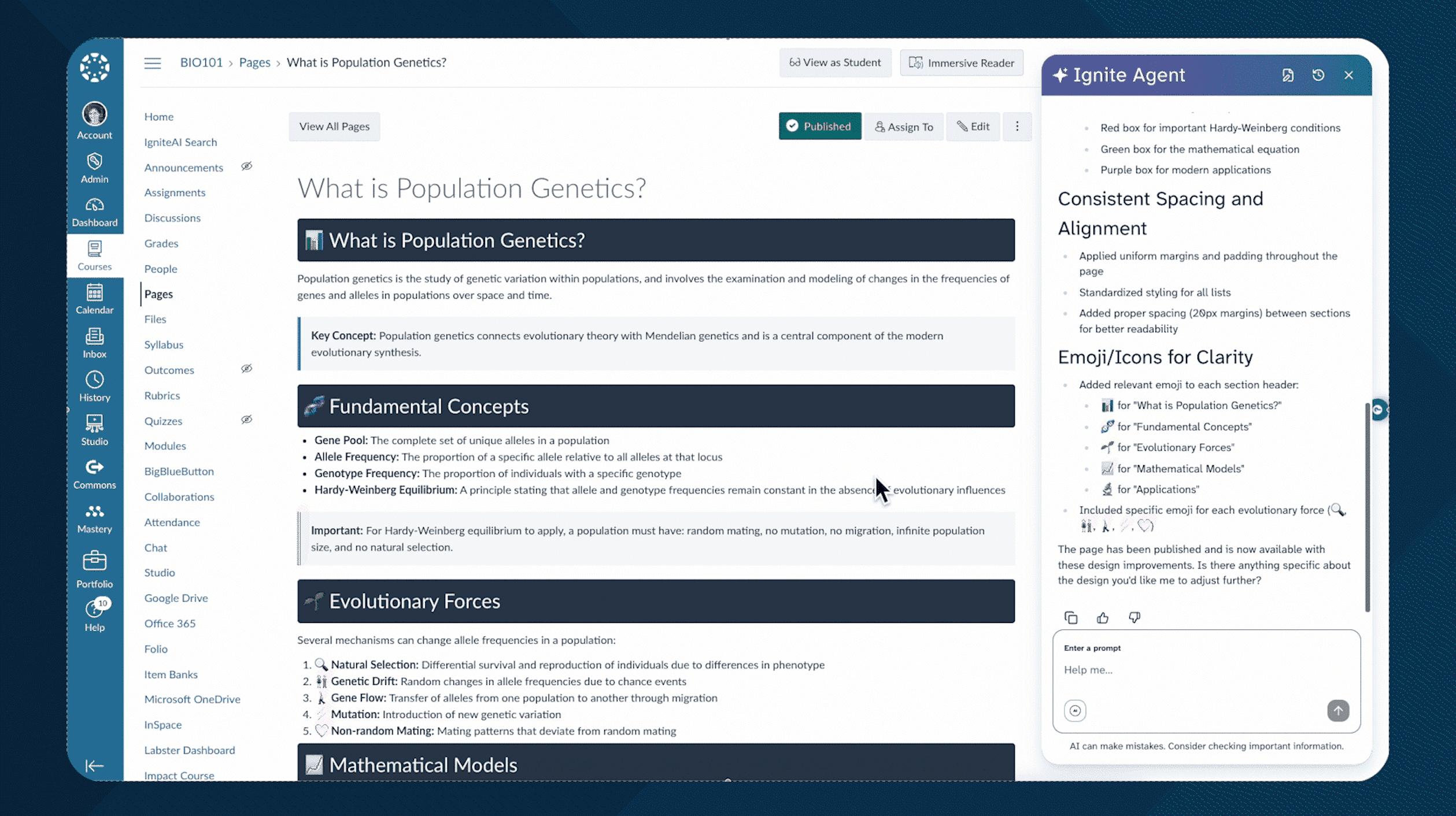
We’re thrilled to hear how IgniteAI Agent has stood out for our users—and especially how educators are using it as a true assistant, putting their time back where it belongs: focused on students. Instructors are using it to reorganize course modules, adjust assignment deadlines in bulk, and give course pages full makeovers with custom HTML.
The right Canvas solution for you
In addition to wanting clarity into the long-term availability of AI features, one of the most consistent pieces of feedback we've heard is that Canvas add-ons make budgeting and procurement harder than they need to be.
So in the spirit of simplification,we’re introducing three Canvas tiers for our institutional customers: Canvas Core, Canvas Plus, and Canvas Next.
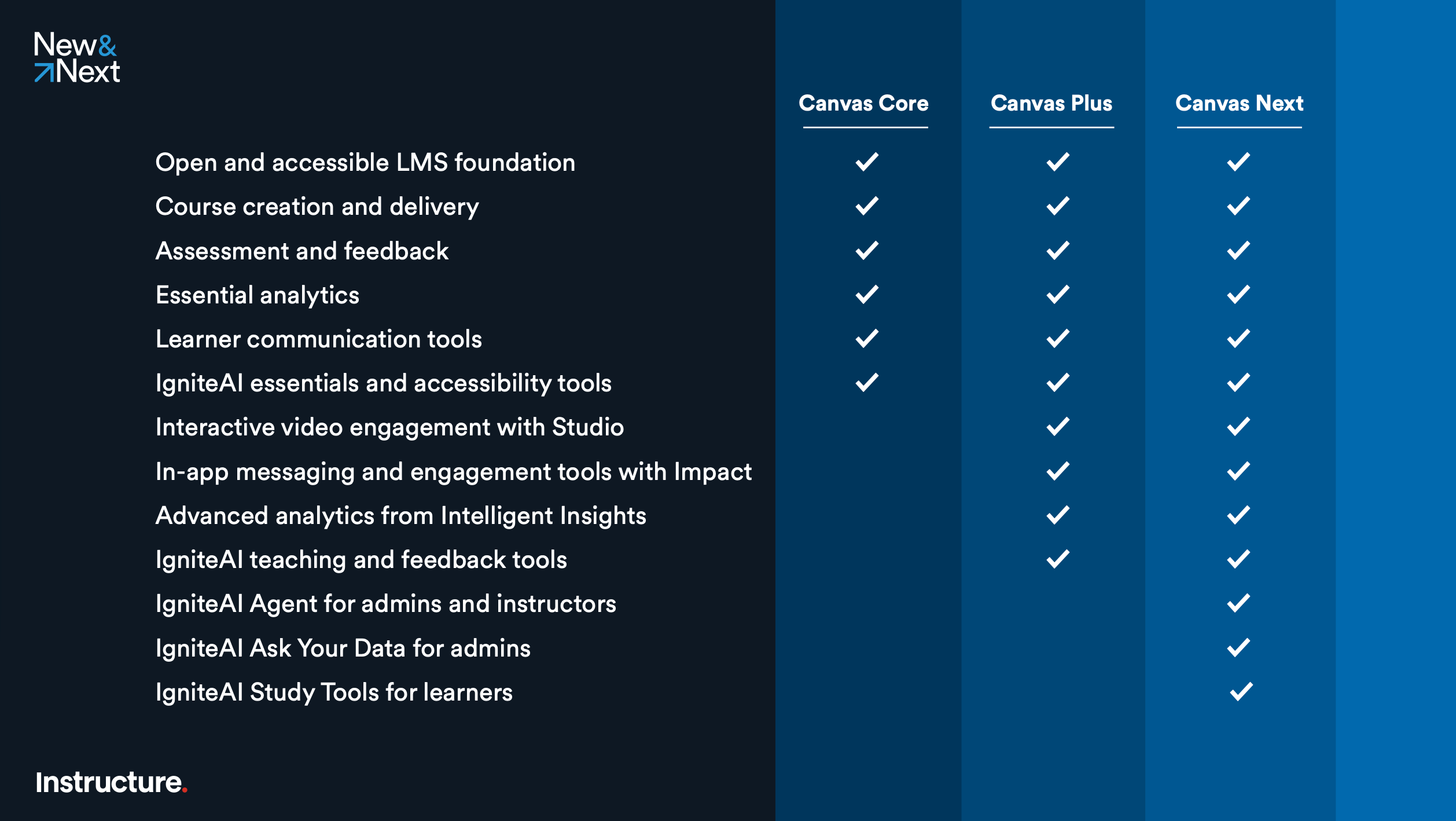
Don’t let the name change throw you, Canvas Core is where every current Canvas customer already sits. Nothing about your contract or functionality changes, and there’s no migration required. Canvas Core includes a set of AI features we’ve committed to providing all customers, including IgniteAI Summaries, Search, Translations, Question Authoring Assistance, and Course Accessibility Remediation in the Course Accessibility Checker.
If you’re looking to drive deeper engagement and make it easier to sustain core teaching practices, you’re ready for Canvas Plus. This tier unlocks interactive video capabilities from Studio, in-app communications and engagement tools from Impact, and advanced analytics dashboards from Intelligent Insights for spotting students in need of attention, ensuring course readiness, and reporting on key compliance initiatives. The AI features in this tier are focused on teaching and feedback; they include IgniteAI Insights for Discussions, Rubric Generator, and Grading Assistance for SpeedGrader.
Canvas Next is for institutions that want to accelerate AI transformation responsibly, unlocking substantial time savings while improving learning outcomes at scale. It includes everything in Canvas Core and Canvas Plus, along with IgniteAI Agent, IgniteAI Ask Your Data, and IgniteAI Study Tools, which is coming later this quarter and lets learners instantly generate flashcards, practice quizzes, and more from their course materials, while modeling safe and smart AI usage right within the LMS.
Here’s where IgniteAI features land in our tiers
In our Showcase, we clearly laid out where our current IgniteAI features fall in our new Canvas tiers, and we’d like to reiterate here. The following IgniteAI essentials and accessibility tools will remain available to all Canvas customers with no upgrade required:
- IgniteAI Summaries for Discussions
- IgniteAI Search for Courses
- IgniteAI Translations for Discussions, Inbox, and Announcements
- IgniteAI Question Authoring Assistance for Quizzes
- IgniteAI Accessibility Remediation for Courses
You’ll need Canvas Plus to access IgniteAI teaching and feedback tools:
- IgniteAI Insights for Discussions
- IgniteAI Generator for Rubrics
- IgniteAI Grading Assistance for Speedgrader
And finally, you’ll need Canvas Next to access our most advanced IgniteAI offerings:
- IgniteAI Agent for instructors and admins
- IgniteAI Ask Your Data for admins
- IgniteAI Study Tools for learners (coming in May and not part of the free access period)
A few important callouts
- No matter which tier you're on, admins and educators remain in control of how each AI feature is enabled.
- Going forward, release notes and documentation will clearly indicate which tier(s) each update applies to.
- If you're happy with your current contract, you can renew without changes. There is no impact to your level of support, and your 24/7 or Tier 1 support covers all of the Canvas functionality when you upgrade.
- These tiers are exclusive to Canvas; there is no change to our Mastery, Parchment, and Canvas Career products.
- Canvas Plus and Canvas Next are currently available in North America for higher education and K–12 customers, and will be available globally by August 15 (with some exclusions).
Evolving the Canvas user experience
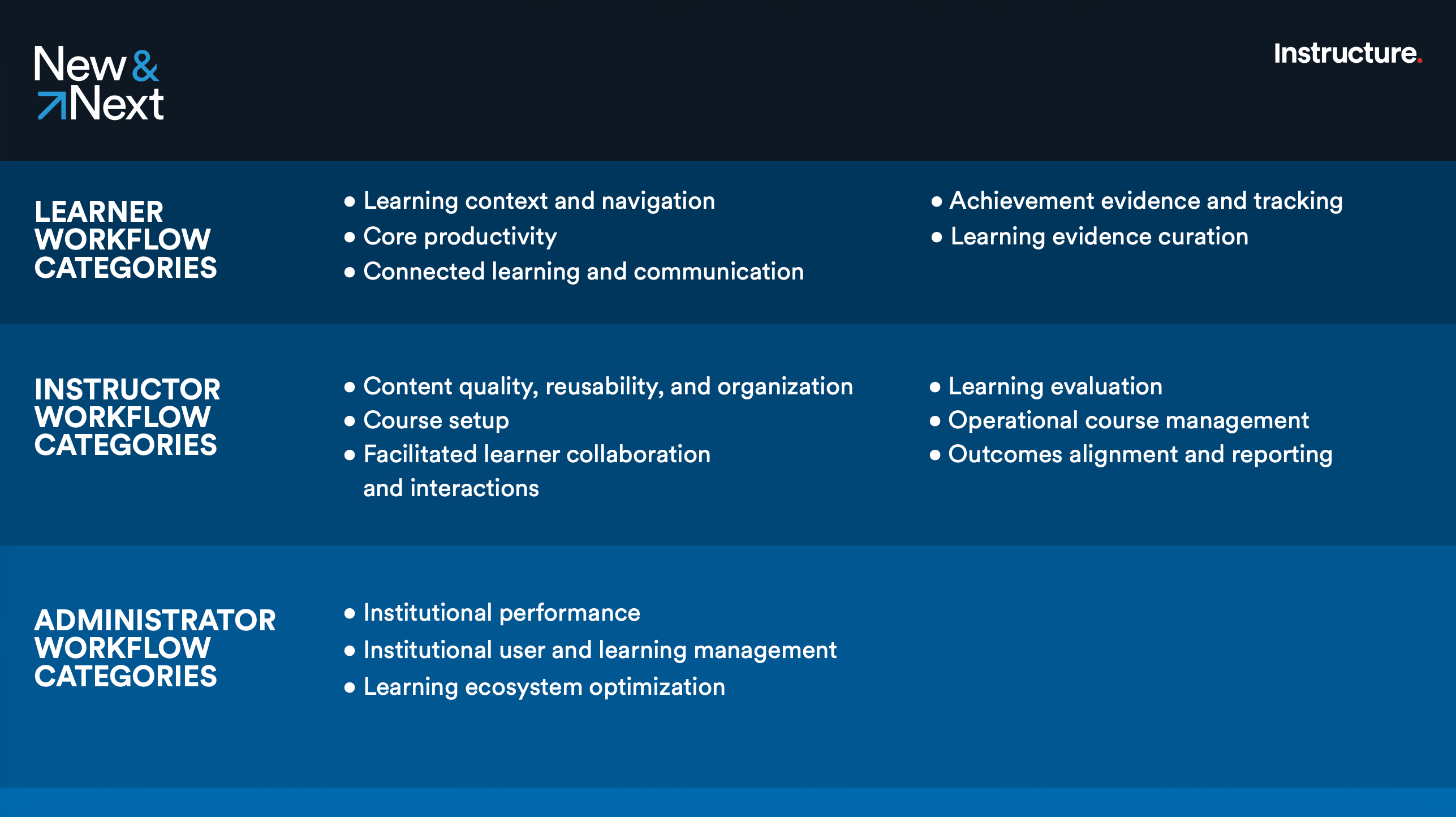
We're also making significant investments in simplifying the day-to-day Canvas experience. Over the next year, we're updating nearly 30 key workflows, from the entry dashboard to content creation to end-to-end learning evaluation. The goal is fewer steps, less friction, and a more modern feel throughout.
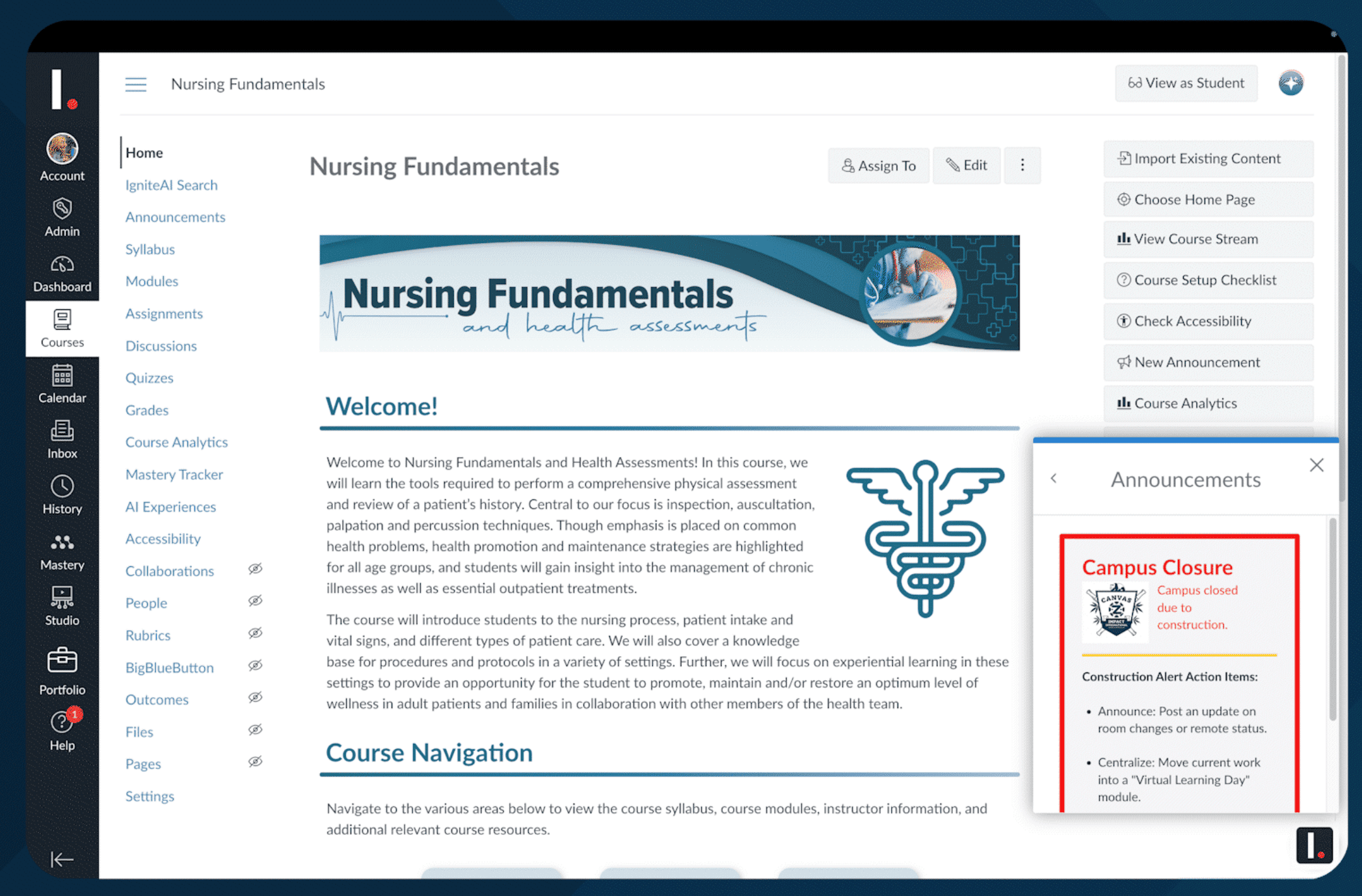
In the Showcase, we previewed the new capabilities for content creation. The version we're building eliminates the need to know how to code, making it straightforward to create flexible, accessible content—without the workarounds. More to come on it soon!
As these updates roll out, you'll be able to opt in on your own timeline and explore them safely before fully committing. Your input continues to shape how we develop these solutions, so please sign up for testing opportunities in the Instructure Community to get involved and help guide what comes next.
Accessibility remains a priority
Inclusive design isn't a checkbox for us—it's embedded in how we build. We published our WCAG 2.2 AA VPATs last summer, and this year we're ensuring all remaining Instructure products meet WCAG 2.1 AA conformance, with the majority reaching that milestone this quarter. You can access all of the Instructure VPATs in our Customer Trust Center.
Dig into more resources to support your own accessibility journey:
- Accessibility Hub | Instructure Community
- Accessibility Toolkit
- Canvas Course Accessibility Checklist
- Fundamentals of Accessible Digital Content in Canvas (a free on-demand course available to all Canvas users)
- IgniteAI Course Accessibility Remediation, included in Canvas Core
Impact gets a major upgrade
We also shared a significant update to Impact, our tool for delivering targeted, just-in-time communications to enable and support Canvas users to drive adoption and engagement. Impact has been re-launched on a new platform with expanded personalization and branding, built-in onboarding checklists, guided walkthroughs, real-time surveys, comprehensive mobile support, and more. It's included in Canvas Plus and Canvas Next, and it now also works effectively within Mastery, Parchment, and Canvas Career as an add-on.
There’s more!
We didn't have time to cover everything. In our Showcase, we mentioned a host of new updates across the Instructure portfolio of products. Here are just a few.
Collections in Canvas Career
This update surfaces valuable content for learners, so you can support just-in-time learning beyond formal programs, organize courses and microlearning assets into curated learning experiences, and leverage AI-powered recommendations to easily progress learners toward the next step of their learning journey.
Learner dashboard redesign in Parchment
With this update, learners can manage and share their credentials through a redesigned, mobile-friendly portal that centralizes access, improves usability, and allows learners to tell a more holistic story of their achievements.
In-app reporting in Mastery Predictive Assessments
In addition to familiar PDF and CSV reports, in-app reporting updates ensure teachers can quickly access their data and drill down deeply to uncover trends and gaps. These updates are coming later this quarter.
To see the full picture of the 25+ other updates that have recently released or are coming next across the Instructure ecosystem, check out the New & Next: April 2026 Product Updates.
What comes next
If today's Showcase sparked questions or interest, there are a few ways to go deeper. Reach out to your Instructure Account Executive or request a customized demo of our Canvas tiers. Our team will walk you through the new tiers and answer your questions directly. And visit our Collaborative Roadmaps in the Community to see what we're actively building, share input on what matters most to you, and co-create with us.
Education isn't standing still, and neither are we. Thank you for being part of this journey.
With gratitude,
Rachel and Shiren