

Research has consistently shown that thoughtful, intentional design of online courses leads to stronger learner engagement, expanded access, and improved student success. The idea that design matters is one that Cidi Labs has explored in-depth by blending insights from learning science with the practical strategies and tools that result in engaging and accessible Canvas courses.
You already know that Canvas LMS provides a strong foundation for designing effective, inclusive digital learning experiences, from its flexible Rich Content Editor to its structured Module functionality. Based on research-backed best practices for course design, Cidi Labs provides clever Canvas add-ons that make it easy for everyone building courses—regardless of technical skills or design expertise—to deliver highly engaging, accessible learning experiences for all students.
Looking back at the wealth of informative research and actionable tips we discussed throughout the Cidi Labs Design Matters digest and webinar series, we’re excited to share the most impactful takeaways. These four key ideas underscore the many reasons and ways that good design truly makes a difference for learners–and how those ideas can be applied in Canvas.
Lesson 1: A little design goes a long way
Course design doesn’t need to be elaborate to be effective. Instead, thoughtful use of visual hierarchy, color, and navigation cues can transform a Canvas course from overwhelming to approachable.
Helpful headings
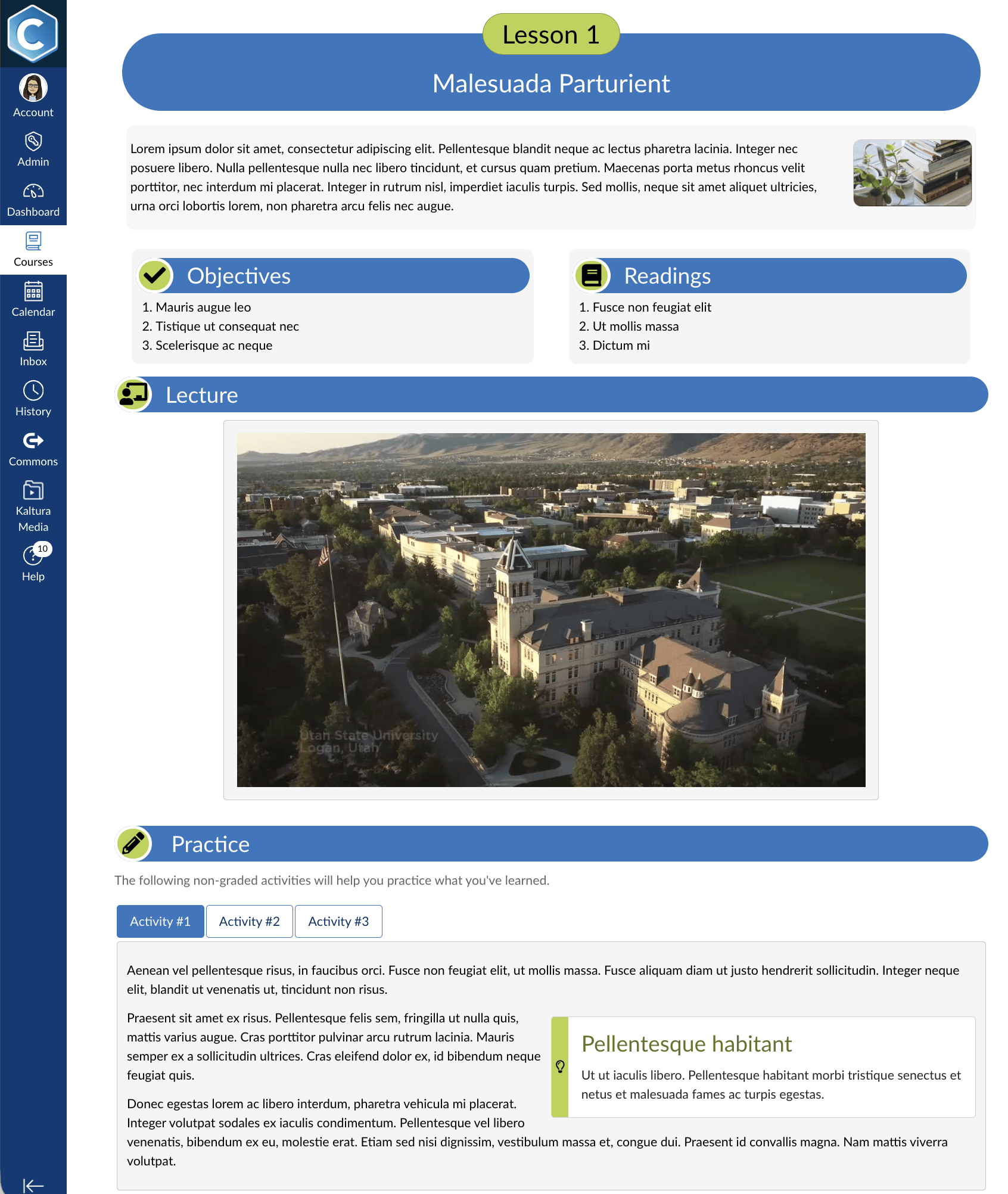
Labeling content with colored headings and simple icons can dramatically improve how students process information. Headings themselves support chunking—breaking content into manageable sections—which is a well-established strategy for managing cognitive load. And with the assistance of color and imagery to draw attention, students can quickly scan a page and understand its structure, helping them spend less time figuring out where to look and more time engaging with the material itself.
While this kind of styling is possible in the Canvas Editor, Cidi Labs makes it easy for educators to apply these small design shifts without coding in Canvas.
With DesignPLUS, the must-have design toolset for Canvas, these simple but powerful design concepts are front-and-center. Instead of needing to flip to the Canvas HTML view to add a colored background to a heading, you can simply select a Theme in the DesignPLUS Sidebar to automatically apply visually appealing, functional style to every heading on the page. The tool also features over 2,500 icons that can be associated with a heading, so the icon and heading respond together to any Theme style applied. And because DesignPLUS works right inside your Canvas course, its Themes automatically leverage your institution’s branding colors, applied in accessible color combinations.
Liven up links
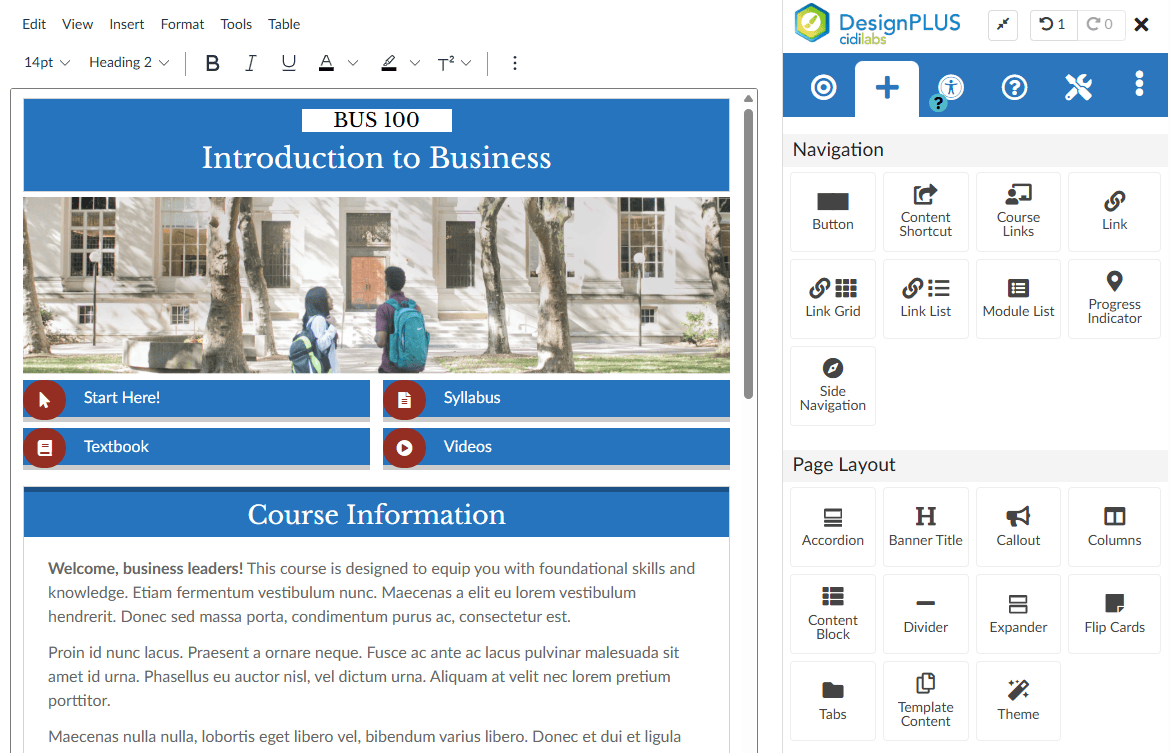
Rather than limiting students to a single linear movement through module content, the Canvas Editor allows hyperlinking that can highlight key pathways, resources, or next steps. However, simple links may not carry the visual weight needed to direct learner attention. Turning easily-overlooked resource and navigation links into buttons can make a course feel more intuitive and interactive for learners, ultimately supporting their sense of agency.
DesignPLUS takes the complexity out of button design in Canvas by handling the coding for you. The DesignPLUS Sidebar lets users easily turn existing links into colored buttons with a single selection or choose from a range of pre-built button grid styles, interactive progress indicators, and on-page module navigation right while editing in Canvas.
Lesson 2: Accessibility is not an afterthought
There’s a persistent myth that designing for accessibility limits creativity or results in less visually appealing courses. However, research consistently shows the opposite: accessible design actually improves overall aesthetics and usability. How? Clear contrast, structured layouts, descriptive links, and other accessible design features don’t just benefit students with disabilities—they improve the experience for everyone. In this way, Canvas courses that are created to be accessible by design result in more effective, inclusive learning experiences right from the start. Yet creating accessible and engaging designs in Canvas when not an accessibility or coding expert can prove challenging.
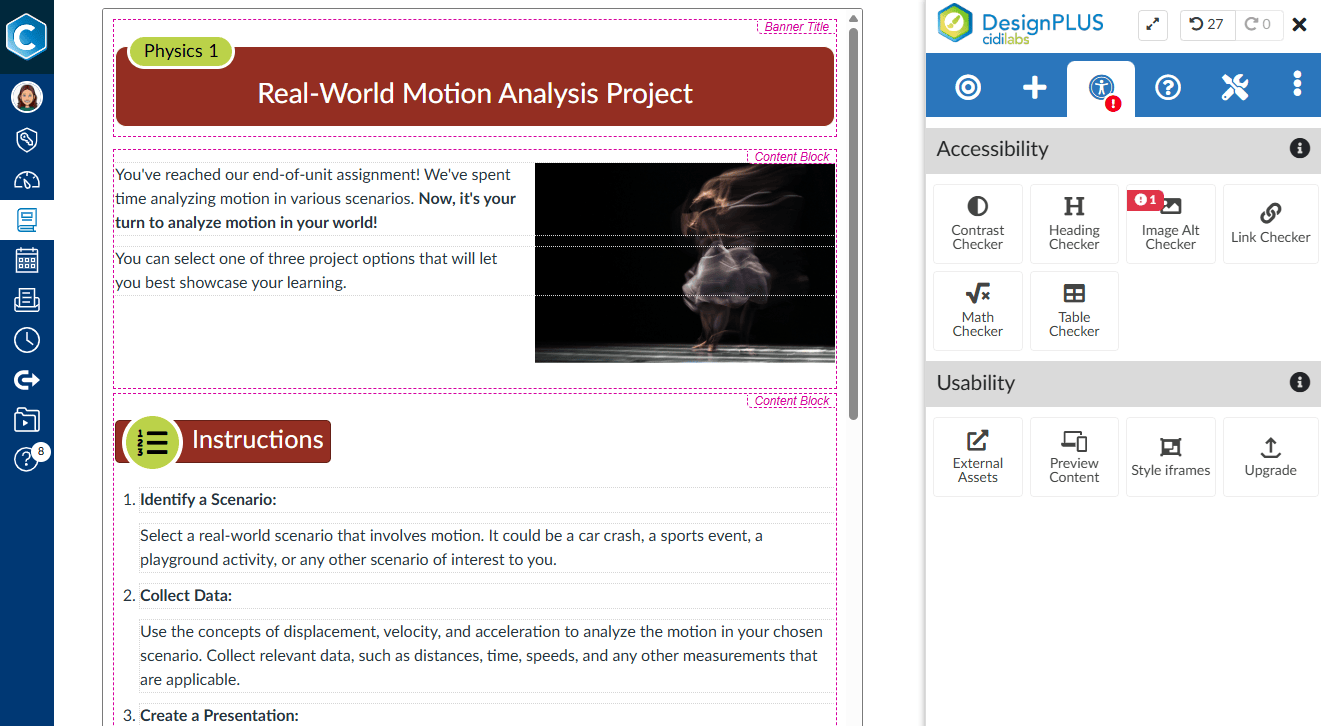
That’s why DesignPLUS makes it easy to build accessible content in Canvas from the start. Leveraging the foundation the Canvas Rich Content Editor provides for designing accessible learning, DesignPLUS works behind-the-scenes automatically applying accessible coding to a nearly endless set of course design elements, from column layouts to streamlined tabs to interactive exercises. To verify accessibility is maintained, DesignPLUS features a robust, built-in accessibility checker that alerts users to a wide range of accessibility and usability concerns and lets them apply fixes quickly and efficiently, all while remaining in Canvas.
Lesson 3: Consistency is key–and novelty agrees!
When courses have a predictable structure, such as consistent layouts, naming conventions, and navigation patterns, students can focus on the content rather than figuring out how to navigate the environment. Research shows that consistency, both in and across courses, reduces cognitive load and increases learners’ sense of self-efficacy. Think of it this way: when students don’t have to relearn how each assignment is organized or where to find key resources, they instead can rely on familiar patterns without expending their mental resources, and that ease-of-use translates to success and a sense of confidence.
But doesn’t all that consistency become monotonous? Wouldn’t that reduce learner engagement? Research reveals the opposite effect: a consistent foundation makes it possible to introduce novelty in meaningful ways. When everything is designed differently, nothing stands out; however, when a course has a consistent base structure, the intentional variations—such as a unique interactive element or a visually distinct page—become more noticeable and impactful.
DesignPLUS by Cidi Labs is built to make balancing consistency and novelty feel easy and efficient in Canvas. First, giving a course a consistent look and feel is as simple as selecting a favorite DesignPLUS Theme to apply to course content. Next, the DesignPLUS Multi-Tool allows users to define a module structure once and watch as the tool creates a full course of modules with custom templates and naming conventions applied.
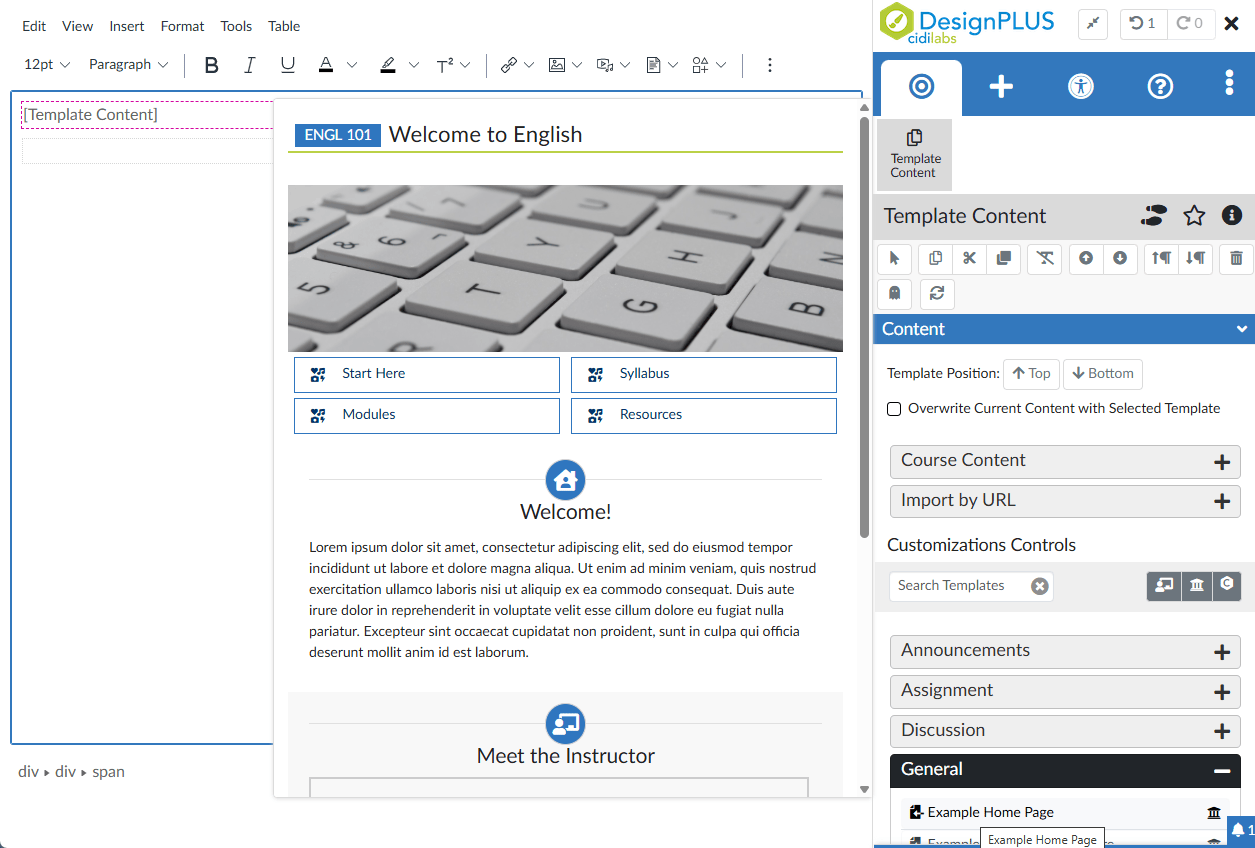
What’s more: with DesignPLUS, schools can create templates for their users at an institution, subaccount, and even team level, all right where editing in Canvas. By providing convenient access to whole item, content block, or small snippet templates inside the Canvas editor, institutions empower their educators to leverage consistent best practices and even support simple ways to infuse novelty.
Lesson 4: Effective design facilitates long-term learning
Perhaps the most important reason that design matters is that good course design doesn’t just make content easier to access–it helps students build lasting understanding and develop skills they can transfer to other contexts.
When students can see how concepts are connected, they are better able to integrate the new information with prior knowledge. In Canvas, educators and designers can help learners organize and store new concepts in long-term memory by arranging content into relevant visual structures. For example, a two-column layout helps learners compare concepts, borders around ideas help group information, and icons can clarify concept relationships.
Take learning retention to the next level with interactivity. Interactive elements, such as knowledge checks, self-assessments, and reflection prompts, further enhance learning by encouraging active engagement. Rather than passively consuming information, students are asked to think, apply, and evaluate their understanding.
But when implementing these more advanced design concepts, course creators may run into accessibility concerns, such as using a table to lay out content or embedding an interactive element that doesn’t support a variety of interactions (such as keyboard or single-pointer control). Course designers may also lack the skills needed to create these more complex elements in the Canvas Rich Content Editor, thereby missing the opportunity to support deeper learning.
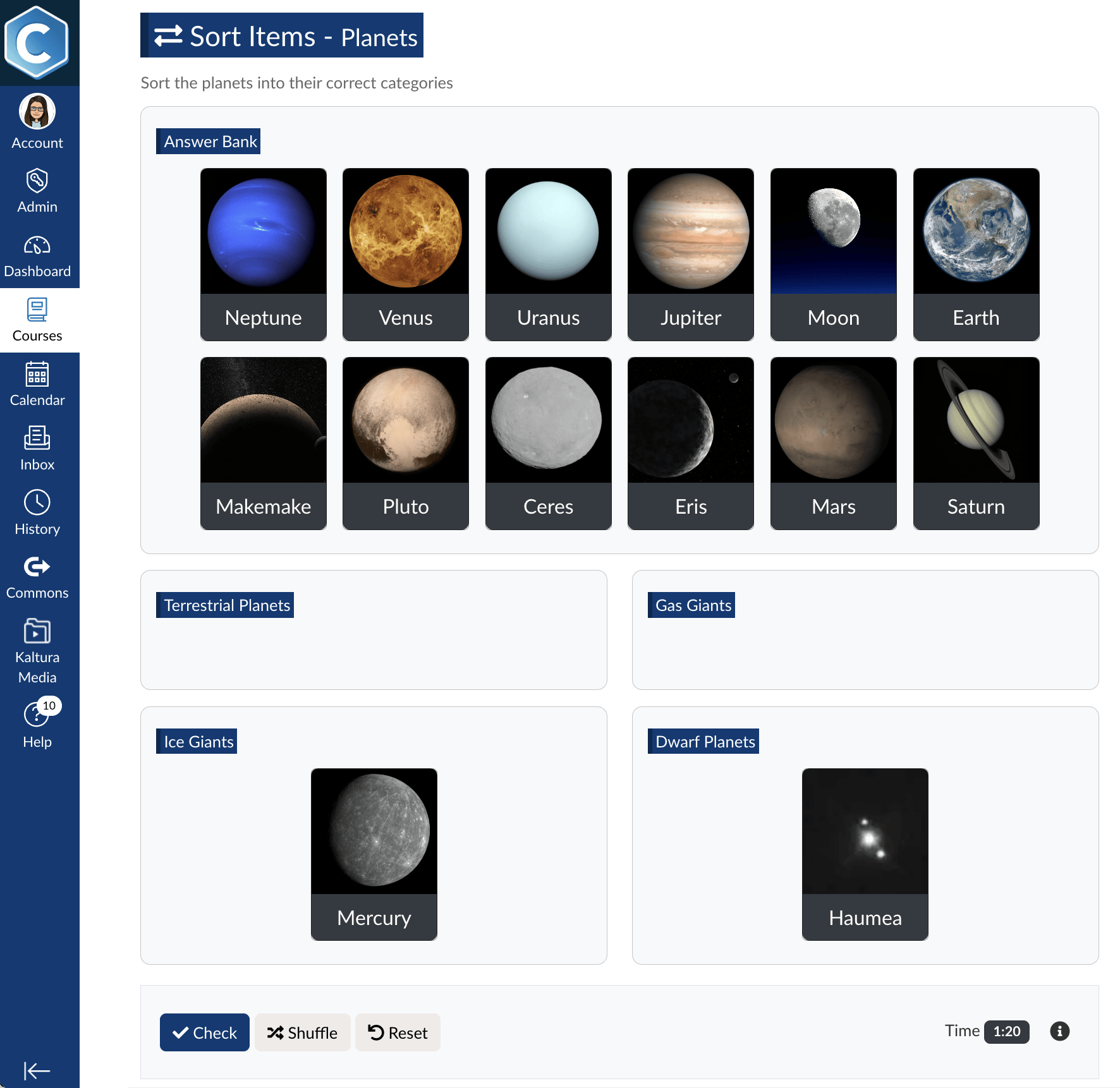
Here, DesignPLUS allows users to build accessible learning and formative assessment experiences right inside Canvas, regardless of skill level. With design elements such as Cards, Columns, Accordions, Tabs, and more, designers and educators can add their content into visual structures that support comparison, options, and sequencing without needing to know how to code. What’s more is that DesignPLUS Interactive Exercises–including Sort Items, Order Items, Flash Cards, and Select All–can be completed using drag-and-drop, mouse clicks, keyboard control, and single-pointer control, ensuring all learners can participate in active learning opportunities.
Designing together
Ultimately, the goal of design is not to impress—it’s to support. When design decisions are guided by research and grounded in empathy for the learner, they become a powerful mechanism for improving education. However, the gap between ideas and impact can feel vast without the right tools, and that’s where DesignPLUS, the must-have design toolset for Canvas, can empower your efforts to design and deliver effective learning experiences at scale. Schedule a demo to see what DesignPLUS can do for you.
To learn more and see these design ideas come to life, Join our webinar “Design Matters: Key Lessons for Better Canvas Courses,” where we’ll do a deeper dive into course design research and showcase how DesignPLUS makes it easy to elevate course design, simplify accessibility, and scale best practices in Canvas.
Date: June 11, 2026, 11:00am MT

For over a decade, Cidi Labs has provided clever, affordable tools for Canvas that help course designers and educators elevate course design, simplify accessibility, and scale the delivery of high-quality learning for all students. In recent years, the Cidi Labs team has been running a monthly newsletter and webinar series called Design Matters, bringing together research and action for effective, inclusive online course design.
Research:
McMullan, T., Williams, D., Ortiz, Y. L., & Lollar, J. (2022). Is Consistency Possible? Course Design and Delivery to Meet Faculty and Student Needs. Current Issues in Education, 23(3).
Scutelnicu, G., Tekula, R., Gordon, B., & Knepper, H. J. (2019). Consistency is key in online learning: Evaluating student and instructor perceptions of a collaborative online-course template. Teaching Public Administration, 37(3), 274-292.
Tindall-Ford, S., Agostinho, S., & Sweller, J. (Eds.). (2019). Advances in Cognitive Load Theory: Rethinking Teaching (1st ed.). Routledge. https://doi.org/10.4324/978
Ifenthaler, D., Masduki, I. & Seel, N.M. The mystery of cognitive structure and how we can detect it: tracking the development of cognitive structures over time. Instr Sci 39, 41–61 (2011). https://doi.org/10.1007/s11251-009-9097-6
Sweller, J., van Merriënboer, J.J.G. & Paas, F. Cognitive Architecture and Instructional Design: 20 Years Later. Educ Psychol Rev 31, 261–292 (2019). https://doi.org/
David Goomas & Kurt Czupryn (2019): Using a Learning Management System Common Template in Teaching Adult Basic Education: Opportunities and Challenges, Community College Journal of Research and Practice, DOI: 10.1080/10668926.2019.1669229
Huun, Kathleen & Hughes, Lisa. (2014). Autonomy Among Thieves: Template Course Design for Student and Faculty Success. Journal of Educators Online. 11. 10.9743/JEO.2014.2.4.
Dalziel, J., & Dalziel, B. (2011). Adoption of learning designs in teacher training and medical education: templates versus embedded content. In Proceedings of the sixth International LAMS & Learning Design Conference 2011: Learning design for a changing world (pp. 81-88). LAMS Foundation, Macquarie University. http://lams2011.lamsfoundation.org/
Newberry, B., & Logofatu, C. (2008). An Online Degree Program Course Template Development Process. MERLOT Journal of Online Learning and Teaching, 4(4).
Related Content
 rce_leaders_blog.jpg
Blogs
 open_standard_blog.jpg
Blogs
 loble_ai_blog_3.jpg
Blogs